Reflection for Week 11: Policies

I read a few people referring to Alberta’s  5 main components to an effective technology framework: 1. Student centered learning  2. Research and innovation 3. Professional learning 4. Leadership 5. Access, infrastructure, and digital learning. In the twitter feed, I also saw the question about where I think my district would stumble, and I think we would be stuck on number 1. I don’t see how we have student centered learning if access is blocked to sites that would help our ELL students ability to further their understandings with the use of media. I tried earlier to look at a youtube by Theresa and my district has enabled a restriction that will not allow me to view her presentation, nor will my district allow me to upload a youtube presentation for this class. (Bummer)

I read lot of BYOD policies from our class. Most of you probably have students that have great and up to date personal devices, but in my very small community of impoverished subsistence members, we don’t have many modern devices. I think a BYOD policy first would require a LOT of bandwidth. I think that a lot of schools can pull this off, but not our site. There was good discussion though and rich with a lot of great reasons for BYOD policies and AUP to be put in place.

Cherie’s district in 2011 wrote a “technology standards curriculum that outlines what should be taught in each grade level starting in kindergarten.” I thought that was a great idea. If we have this policy, just think of how technology can be used in the upper grades! The possibilities are endless.

In the twitter feed, the questions were amazing! One that I really liked was, “How can connected learning change the culture of learning environments?” I remember reading about connected learning and how this can help our students find resources in people from different sections of the world in fine tuning their learning and also the fact that we can possibly help our students build career choices and even get them on their way while they are still in school! I know for a fact that this is a possibility. My son is going to be a senior, and he will receive his private pilot’s license this fall because of the opportunities through our school district. He is also connected to ANSEP at UAA and he has a taste of geology. So many opportunities can open up when we expose our students to the potential jobs out there! He might come from a community of 60, but he has many choices and is learning about what his possible careers can have for him. Yay technology, lets hope our schools continue to use technology to help our young ones in the future.

Week 11: District Policies in Technology

What specific policies will help your district prepare students for current and emerging technology use? How can you help lead your district in creating these policies?

When I was looking at the LKSD technology policies, I saw that number one was the fact that the school wanted to give reliable internet access to all of its 26 sites. In a school district the size of Pennsylvania and with a scattered population between our site of 15 students and the biggest site of 300 students, it might be quite challenging. On the teacher and school site part, I see a lot of internet issues related to sites blocked because they are “inapporprite social media or video viewing sites”. We do have internet access, but our access is limited because videos are blocked. We also have server problems at site that slow access a lot of the time(LKSD, 2013).

Our district policy also includes having technology as a classroom for students. The district has put in a lot of funding for teachers to have video conference classes for HS students to participate in classes that might not be offered at site because some sites have only 2 certified teachers to cover the whole school. The use of this technology and the upkeep is pretty expensive. We have to work with the local internet service provider, GCI to take care of the connections and it works most of the time. This coming school year, our HS students are taking a required science class and Algebra 1 and 2 at site. It is beneficial for our school district, but I wonder if online classes would be better in a blended learning environment if the teacher can help with instructing as the students move through their classes. It would be interesting to compare the sustainability of online classes versus the video conferencing we have now (LKSD, 2013).

Another policy of our school is to use technology to help with professional development. The district streams all training so that it can be accessed in the future through an online wiki site. I think it works well. I have taken training sessions targeted to my individual needs and there is a myriad of choices to cover K-12 as well as administrations classes (LKSD, 2013).

After looking at the Alberta website and seeing the blocked sites, I think I would like to include policies that open up the web sites that are currently blocked, but provide an extra acceptable use policy that includes educating students as well as staff about what kind of technology we can use to the advantage of our student centered learning.
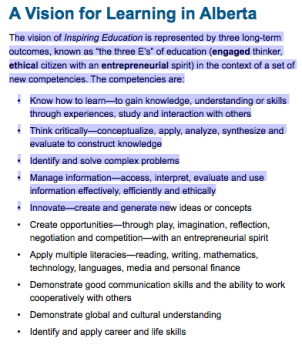
Screen Shot 2015-08-03 at 1.27.30 PM

The vision from Alberta is what I would add to our policies for having more access to educational websites for student centered classroom use. I would include that in the acceptable use policies, that our job is to create a classroom environment that benefits the student in learning through the use of media, music, and pictorial explanations in technology. I would include for teachers to use the technology in an ethical and appropriate way for the use of education to further student understanding. These three E’s: engaged thinker, ethical citizen, and entrepreneurial spirit are clear guidelines to an acceptable use policy in my opinion(Alberta Ministry of Education, 2013). Blocking websites does not help in teaching our students to use technology to our advantage.

Winske (2015) says that encouraging the use of technology makes us responsible to create a safe learning environment for all students. This raises other questions we have to think about, like “Should you allow devices from home on your school network? Should certain websites be blocked?  What role does social media play? How do you prevent Cyber bullying?” I think that an acceptable use policy has to include education on the part of the school district and training for the teachers and students to learn to be respectful engaged, ethical entrepreneurs!

My hope for my school district is that more bandwidth is used, more education on appropriate use, and allowing us the full use of media for educational purposes in our ever changing technological advances that connect even the most remote sites to the rest of the world.

References:

Alberta Ministry of Education (2013). Alberta learning and technology policy framework. Retrieved from http://www.education.alberta.ca/LTPF.

Lower Kuskokwim School District Education Technology Plan June 2013 to Jun3 2016. Retrieved on August 3 from http://www.lksd.org/lksd/TAI/LKSD%202013-2016%20Official%20Technology%20Plan-1.pdf

Winske, C. (n.d.). Tips for Creating Technology Policies for K-12. Retrieved July 24, 2015, from http://www.k12techdecisions.com/article/creating_an_acceptable_use_policy_for_mobile_learning_initiatives

Week 10 Reflection

Electronics as a mode of artful expression seemed like it was a distant cultural world away form myself. I didn’t know how easy it was to create LED art through arduino or chibitronics. I was unaware that these “crafts” of electronics were on sale on the internet and that these can be purchased for my classroom.

Chibitronics and the conductive pen, Wow! That by itself is artful technology because of the way you can manipulate the copper wiring to create points for light to occur. Arduino, using a thread to conduct electricity to LED lights is pretty impressive as well. You know, when I was younger the light up shoes were impressive to see. Now people can wear dresses that look like they are part of a christmas tree!

When I did research, my thoughts raced as I looked into the cutting edge technology related to wearable technologies beyond the classroom and it took me to monitoring health issues, aiding the blind with smart glasses.

I even looked at the wearable technologies on sale at amazon. I saw that even GoPro cameras, smart glasses, and small cameras embedded into things you can wear are electronic devices. My colleague has a fitbit and she explained that she and her friends compare how much exercise they get each week using the data collected on her wrist. Those devices make exercise, or taking pictures so simple that it takes the thought and calculation away from yourself. It made my mind connect to microwave dinners and how innovations created ways to just heat food for dinner instead of cooking a meal on the stove. These examples are similar in my opinion because it seems like the technological advances happening are taking the calculation, the planning, and the work out of what you’d do and computer chips and senors are taking the place of what we used to have to do to figure out how many miles we exercise, or take the time to prepare a meal. I don’t know if my rambling makes sense, but technology and the advances in these times are remarkable.

The blogs and twitter this week were interesting as well. Scott persuaded me that there are math components in chibitronics that I hadn’t considered. I’m thankful for Tristan to have helped with the twitter session and gosh, I was so nervous. I hope it really was a good chat. 🙂 Til Next time! (PS I am shocked that I am learning so much.)

week 10: Crafting with Chibitronics

I started off learning about electronics and the technological advances with the YouTube presentation “How to sketch with electronics.” (Buechley, 2012) The invention of the pen to conduct electricity on paper was simply amazing. To get more information, I watched the chibitronics demonstration from the resources to explore list. It was interesting to see how the electric circuits have a potential to become complicated pieces of LED art (Tu, 2015). This would be good for showing students how the circuits can have a potential for becoming art pieces.

The chibirtonics research I did is similar to the conductive pen, but instead of a pen, it is adhesive copper to conduct electricity. I watched some videos from circuitstickers.com (2014)  and remembered how I personally learned about electric circuits in elementary school. I remember doing experiments with wire, a battery, and a light bulb thinking it was amazing. I connected it to how electricity must travel with circuits and pulses of electricity with switches.

I see the benefit of chibitronics for science class. I watched how to videos and it seems pretty simple to use. I also saw that we can order kits for student use and see how fun it would be to make simple circuits, double circuits, and those things. Chibitronics will be a fun way to  be creative and design cards, or art as well. I can see the possibilities for this. This could possibly lead to research what material is a good conductor of electricity as well.

Creating lighting on clothing is interesting, but I think I’ll stick to paper, especially for the elementary grades and the introduction to circuits. Who knows what else we will be seeing in the forefront of technology. 🙂

Resources

Buechley, L. 2012. How to sketch with electronics. Retrieved from https://www.youtube.com/watch?v=vTBp0Z5GPeI

Chibitronics. 2014. Retrieved from circuitstickers.com on July 22, 2015.

Tu, Pu Gong Ying. 2015. Interactive Light Painting: (Dandelion Painting).  Retrieved from https://vimeo.com/40904471 on July 22, 2015,

BYOD Reflection

My site does not allow personal devices. The administration set up a zero tolerance policy for personal devices saying that it disrupts school time including extra curricular academic and sports activities.

My initial research brought me to the fact that some sites needed technological advances but they didn’t have the money for such devices so they created a BYOD policy to meet the tech needs of their educational component. I also saw that one particular school bought a similar device for students to be able to share.

I am still on the fence with this one because my school district serves 26 sites and we all share a single server. The school district has restricted all social media sites including YouTube and other places that offer video streaming because of bandwidth issues. It also is constantly changing security passcodes as not to get the community to use their internet service. There are only three homes that have limited internet access with slow bandwidth. In a community with 60 people, three households with internet access is very low. Realistically, our community would not do well with a BYOD policy because not many people can afford the newer technological devices. I know of only three students with smart phones, and two families with lap tops. Personally, our community cannot support a technology plan.

My site does have a one-to-one computer access for school reports and research along with using selected sites for a semi-blended classroom to accommodate the mulit-grade classes. If we do have internet access, unlimited bandwidth without all the restrictions, a BYOD policy would be beneficial for my site. There is research out there that does say it works, but not just yet in LKSD.

Week 9: Does every school need a “BYOD” policy?

Should every school have a BYOD Policy? There are many pros and cons to this  initiative.

“With the proper policies and ground rules in place – and the program doesn’t exist merely to cut costs and corners – BYOD can work for educators and students. If banning mobile devices increasingly becomes an outdated option, districts must ensure that schools have the tools and resources to create safe and constructive learning environments.” (Chaband, 2012) We have to be creative if this is going to work out. There are policies and rules with restrictions that need to be thought out with the implementation.

I see that there are many outside factors to this question and it depends on whether or not these devices are already available in the community, and if there is a reliable internet service provider in the area. This seems to remedy the budget issue with how school funding is being cut,  expectations are growing for both teachers and students, so people are thinking outside the box to get more of our schools into the technology age with the resources that may already be available (Chaband, 2012).

A big issue for me with this brings up the fact that we need to have proper training for teachers and administrators to be able to implement a wide variety of devices in order to produce the educational goals we set by implementing a BYOD.

The pros I read had to do with students being more responsible for their devices, and being more apt to doing their homework. I also saw that they could be issued electronic books(Walsh, 2012). This could lead to a more personalized learning experience for students (Bloise, 2013).

In my opinion, it’s up to the school district to decide if this works and if it’s tangible. All the outside factors need to be thought of. The question should be, “Is it worth the time to adopt a BYOD policy?”

Resources:

Bloise, Z. 2013. 4 student advantages of bringing your own device policies. Wowzers. Retrieved on July 13, 2015 from http://blog.wowzers.com/bid/317403/4-Student-Advantages-of-Bring-Your-Own-Device-BYOD-Policies

Chaband, E. 2012. Should schools embrace bring your own device?. Education policy. Education today. Retrieved on July 12, 2015 from http://neatoday.org/2012/07/19/should-schools-embrace-bring-your-own-device/

Walsh, K. 2012. Making BYOD work in schools. Retrieved from http://www.emergingedtech.com/2012/12/making-byod-work-in-schools/

MineCraft: What I’ve learned and how I’d apply to my students

Believe me, I don’t condone very many games in my classroom unless they are visibly educational. I didn’t think that MineCraft was very educationally relevant until I started doing the research around the subject matter. It requires strategy, spacial reasoning, and math skills.

I had my 9 year old daughter show me what she likes to play on MineCraft so she set up a world for me in the creative section on her IPad. She showed me how to build a house, and while she was, she built a 28 by 28 foot home for me by 6 stacks high using a pattern. While she did this, she was multiplying, using spacial reasoning, and figuring out a quick pattern while she talked me through the measurements. In my observation, I saw that I might assign some measurement skills in building homes with rooms, and even building city blocks with exact perimeters and areas as math extensions. She said that people can people could work together as well, so that also brought me to the conclusion that I can use this creative section to have students collaborate with each other to build a community infrastructure in math as homework since they consider building homes fun and building their worlds.

She said her personal world has a house that she’s built with rooms and much bigger than mine. This might be fun homework!

I didn’t get a chance to see the survival mode because our internet service went down for a few days, and the signal strength comes and goes. I’m not having much luck with internet access from home this summer which is  a bummer and a hindrance to any kind of work lately.

In my research, I learned about the way MineCraft uses tools to survive and build an alternate universe where a person must sustain themselves to live. I think I would limit my time with MineCraft to math in the study of measurement, area, perimeter, multiplication, and patterns for homework and after school extension activities.

week 7: 3D Printing and Reflection all in one

Okay guys, 3D printing is officially awesome in my opinion. I did some interesting reading about what 3D printing can do, and I was blown away by the thought of printing off a piece of my finger after cutting it pretty badly. Just think if the technology was present, the recent cut I had to the emergency room could have replace the nerves that were cut on my hand which are numb. I didn’t think that would ever be possible, like how people in the past thought that we wouldn’t ever be able to hold cell phones, hold personal computers, or have wearable devices with sensors on clothing!

Okay, so 3D printing in schools! I’m blown away by the video I watched where a machine was printing a plastic model in a classroom. I am convinced that these devices would help build motivation and excitement. Students building actual models for projects connects learning from texts and print to projects they can build and make to extend learning. The way that the programming works might also work well with the coding project I was skeptical about last week, as well. We can connect the learning and making plastic replicas related to the subject matter! How exciting to have a replica of a terrain we are studying, with the animals and the plants, lifestyles in a certain time period for social studies! We can model molecular elements in science! We can build a character and setting for a language arts project. The ideas are endless! In cultural relevance, we can use the 3D printer to build tools, kinds of shelters, and how to survive in winter elements. I think it will help the kids who need to see, feel, and touch to learn. It is also an extension for our accelerated students. I believe this would be an excellent classroom tool.

I have to admit that I may be I’m old fashioned. The thoughts in my imagination are wondering what is applicable to my students. I’m fighting the thoughts of what is amazingly tangible learning, to what I’m required to teach now. With teaching my English Language Learners, I have to find ways to make learning concrete, so this might be a way for my rural school to have concrete materials for subjects.

If only we had this technology in schools.

week 6 reflection

Coding? I learned about coding, read some interesting arguments for it and how it is so beneficial in the technology age. Thanks for educating me on coding guys. I’m just hard to convince at this point. There is just so many other requirements and mandates that teachers are expected to follow with “fidelity to the curriculum”. Teacher’s have so much to teach and I personally believe that I am a teacher to young students with a responsibility to character development including the responsibility to teach social skills they might be lacking.
Maybe coding will become a class my school district required some day, but for now coding will in the category for me to have learned about to think of some day. I appreciate the way coding teaches people to think critically, and to use specific structure. I also understand that my students have many needs and I have a list of required tasks at my job.

(I finally got internet access!)